Workday Pro Talent and Performance サンプル問題プレビュー(抜粋)
収録内容から抜粋したサンプル問題です。「解答・解説を表示」をクリックすると正解を確認できます。
サンプル問題 1: You recently created a talent pool to help develop potential new managers. You added ten managers to the pool. Now you want to assign two self-development goals to each member of the talent pool. What task allows you to assign those two goals to all members in one event?
A: Create Goal for Worker
B: Manage Organization Goals
C: Maintain Goals Setup
D: Add Goal To Employees
正解:D
Explanation: In Workday Talent & Performance, when you want to assign goals to a group of employees (such as everyone in a talent pool), you must use the “Add Goal To Employees” task. Here ’ s why: Create Goal for Worker This task is specific to one worker at a time. It would not allow you to mass-assign goals to multiple workers. Suitable when you want to add a goal for an individual employee. Manage Organization Goals Used to define organization-wide goals (e.g., company objectives). These can be cascaded, but they are not tied to an action that assigns two goals directly to all members of a talent pool. Maintain Goals Setup This is for configuring goal settings (e.g., categories, weights, behaviors) at the tenant level. It doesn’t execute the action of assigning goals to workers. Add Goal To Employees Specifically designed for mass goal assignment. You can select multiple employees (for example, all 10 members of your talent pool) and assign the same goals in a single event. This is the only option that fulfills the requirement of assigning two self-development goals to all members in one step. Reference Talent & Performance Study Guide topics: Goal Management: Covers the difference between worker-specific vs. mass goal actions. Talent Pools: Workday documentation explains that pools are often used for succession planning and development, and “Add Goal to Employees” is the correct bulk action for assigning development activities. External Training Reference: ERP Cloud Training notes that “The Add Goal To Employees task allows administrators to assign multiple goals across groups such as talent pools or organizations, enabling faster alignment with development plans.” 【 web source on Talent & Performance training 】 Workday Pro Talent & Performance Flashcards: Confirm that the correct way to mass assign goals is via Add Goal To Employees task, not Manage Organization Goals (which is only for defining org-level goals)
サンプル問題 2: What field does Workday require when you create a competency?
A: Proficiency Rating Scale
B: Competency Description
C: Name
D: Category
正解:C
Explanation: When creating a Competency in Workday Talent & Performance, the system enforces certain required fields. Name: This is the mandatory field. Every competency must have a name so it can be identified in job profiles, performance reviews, and talent pools. Without a name, Workday will not allow you to save or proceed. Proficiency Rating Scale: This is important for measuring competencies (e.g., Basic → Intermediate → Advanced → Expert). However, it is not required at the point of creation. If you don’t assign one, the system can still save the competency, though you may not be able to rate employees effectively without linking a scale later. Competency Description: Highly recommended for clarity and reporting. But this field is optional, not enforced by Workday. Category: Used to group competencies (e.g., Leadership, Technical, Communication). Again, optional and for organizational purposes only. Thus, while other fields add functionality and structure, the only required field to create a competency is the Name. Reference Talent & Performance Learning Material: Competencies are created with “Name” as required, while “Description, Proficiency Scale, and Category” are optional metadata used to support evaluation and reporting. Workday Pro Talent & Performance study outlines: Under the Competencies section, it explicitly states: “The only mandatory field is Name. Description, Proficiency Rating Scale, and Category are optional fields that can be configured for richer competency management.” 【 web source Talent & Performance training + community notes 】 ERP Cloud Training C Workday Talent & Performance course: Highlights that “Name is required when creating a competency; all other fields are optional depending on business needs.”
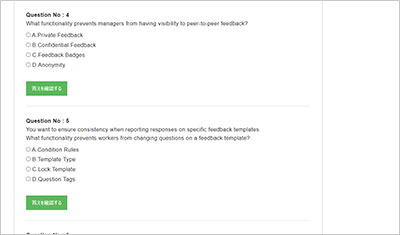
サンプル問題 3: A worker is providing feedback and they only want it to be visible to the feedback recipient. What kind of feedback allows for this?
A: Confidential
B: Anonymous
C: Public
D: Private
正解:D
Explanation: In Workday, Private Feedback is visible only to the feedback recipient. Confidential Feedback is visible to both the recipient and their manager. Anonymous Feedback hides the identity of the feedback giver but may still be visible to managers or admins depending on configuration. Public Feedback is broadly visible across the organization or workgroup. Therefore, the only feedback type that ensures visibility only to the recipient is Private Feedback. Reference: Workday Talent & Performance study material on feedback types. Workday Pro Talent & Performance training notes: “Private feedback is restricted to the recipient alone; confidential feedback includes the manager, while public feedback is visible more broadly.”
Workday Pro Talent and Performance問題集による問題演習は、Human Capital Management試験の復習に利用できます。参考書を読むだけでなく、実際に問題を解くことで理解度を確認できます。
Workday Pro Talent and Performance問題集は復習ツールです
効率よく試験対策を進めるためには、学習段階に合った復習教材を準備することが大切です。まずはWorkday Pro Talent and Performance問題集で全体像を確認します。
まず、Workday Pro Talent and Performance問題集には、Workday Pro Talent and Performance試験対策に向けた練習問題と解答が含まれています。
次に、Workday Pro Talent and Performance問題集に取り組む際は、難しい設問や長文問題に時間をかけすぎず、印を付けて後から重点的に見直す方法が効果的です。
継続的に問題演習に取り組むことで知識の定着を確認できます。Workday Pro Talent and Performance問題集を活用することで、復習を計画的に進められます。
Workday Pro Talent and Performance問題集には、Workday Pro Talent and Performance Exam試験の主要な知識ポイントと設問形式がまとめられており、復習における弱点の把握に役立ちます。
Workday Pro Talent and Performance問題集の使用は効果的です。同じ知識ポイントが複数の質問に何度も現れることがわかった場合、知識ポイントの質問に対する感度を維持しながら、潜在意識の中で質問を理解するルーチンがあります。
Workday Pro Talent and Performance問題集の使用は、Human Capital Managementフィールド知識構造に関する知識に基づいている必要があります。基礎が非常に弱いかゼロでさえある場合は、最初に本から始める必要があります。そうしないと、効果が逆効果になります。
通常、試験には多くの原則はありませんが、方法とアイデアは似ています。Workday Pro Talent and Performance問題集のすべての質問をマスターした後は、質問を行うための一種の慣性があります。試験で同様の質問を見ると、あなたの心は考えやアイデアがあります。
しかし、盲目的に質問をするだけでは効果が得られません。間違った質問を覚えることを学ぶ必要があります。これは理解しやすいです。Workday Pro Talent and Performance問題集でエラーが発生しやすい質問を見つけた場合は、手元にあるこの質問の質問と回答を書き留め、質問の横に独自の理解を記入する必要があります。
Workday Pro Talent and Performance問題集は、積極的に練習するだけでなく、積極的に整理することで、調査している問題を明らかにすることしかできず、質問を理解して回答するのに役立ちません。これには、トピックトラップ、知識の抜け穴、回答スキルなど、重要と思われる情報をノートブックに整理し、電話で写真を撮り、断片化した時間を使用して統合する必要があります。
Workday Pro Talent and Performance問題集に含まれるさまざまな質問タイプ
Workday Pro Talent and Performance問題集は、Workday Pro Talent and Performance試験に関連する知識ポイントを包括的に要約し、さまざまな質問タイプの複数の質問に分散しています。質問の種類には、通常、単一選択の質問、複数選択の質問、正誤問題、ドラッグマップの質問、空欄に記入する質問、実験的な質問が含まれます(試験バージョンごとに異なる種類の質問が含まれます)。
単一選択問題は出題数が多く、知識の定着度をテンポよく確認しやすい形式です。Workday Pro Talent and Performance問題集で繰り返し演習を行うことで、設問のポイントを素早く把握できるようになります。
画像のタイトルをドラッグすると、通常、タイトルによってシーンがデザインされ、画像(画像にはテキストまたはコードが含まれます)を指定された手順またはリンクにプルして、シーンを合理化できます。質問の内容が長くなることもありますが、Workday Pro Talent and Performance問題集のドラッグする質問をすべて理解すると、ルーチンがいっぱいであることがわかります。
オプションの学習本と教育ビデオ。代わりに、それは学習と習熟度、およびWorkday Pro Talent and Performance問題集を通じて明らかにされた弱点を統合することです。演習を間違えた場合は、本と説明ビデオの中で答えを探してください。この時点で、知識のポイントを整理するために読むよりも、目的を持って答えを検索する方がはるかに効果的です。
ご入金後、マイページからWorkday Pro Talent and Performance試験問題集の日本語版と英語版の2言語セット(PDF形式)をダウンロードできます。また、試験範囲の改訂や問題集の更新が行われた場合、ご購入日から1年間(365日間)は更新版を追加料金なしでダウンロードできます。返金の条件は返金ポリシーに従います。