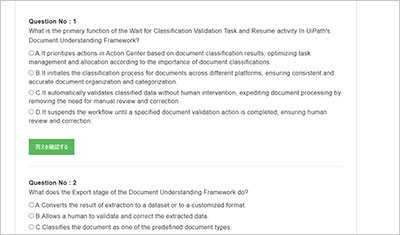
サンプル問題 1: When is it recommended to use Main-ActionCenter in the context of the Document Understanding Process?
A: When implementing an attended process.
B: When testing locally or implementing an attended process.
C: When testing locally.
D: When testing locally or implementing an unattended process.
正解:B
Explanation: Main-ActionCenter is a workflow that allows you to create and manage Document Understanding actions in Action Center, which is a web application that enables human intervention in automation processes. You can use Main-ActionCenter when you want to test your Document Understanding process locally, or when you want to implement an attended process that requires human validation or classification of documents. Main-ActionCenter is not recommended for unattended processes, as they do not involve human interaction. References: Action Center - Document Understanding activities, Document Understanding Process 22.10 now in General Availability!, How to Start a UiPath Document Understanding Project
サンプル問題 2: What components are part of the Document Understanding Process template?
A: Import. Classification. Text Extractor, and Data Validation.
B: Load Document. Categorization. Data Extraction, and Validation.
C: Load Taxonomy, Digitization. Classification, Data Extraction, and Data Validation Export.
D: Load Taxonomy, Digitization. Categorization. Data Validation, and Export.
正解:C
Explanation: The Document Understanding Process template is a fully functional UiPath Studio project template based on a document processing flowchart. It provides logging, exception handling, retry mechanisms, and all the methods that should be used in a Document Understanding workflow, out of the box. The template has an architecture decoupled from other connected automations and supports both attended and unattended processes with human-in-the-loop validation via Action Center. The template consists of the following components1: Load Taxonomy: This component loads the taxonomy file that defines the document types and fields to be extracted. The taxonomy file can be created using the Taxonomy Manager in Studio or the Data Manager web application. Digitization: This component converts the input document into a digital format that can be processed by the subsequent components. It uses the Digitize Document activity to perform OCR (optical character recognition) on the document and obtain a Document Object Model (DOM). Classification: This component determines the document type of the input document using the Classify Document Scope activity. It can use either a Keyword Based Classifier or a Machine Learning Classifier, depending on the configuration. The classification result is stored in a ClassificationResult variable. Data Extraction: This component extracts the relevant data from the input document using the Data Extraction Scope activity. It can use different extractors for different document types, such as the Form Extractor, the Machine Learning Extractor, the Regex Based Extractor, or the Intelligent Form Extractor. The extraction result is stored in an ExtractionResult variable. Data Validation: This component allows human validation and correction of the extracted data using the Present Validation Station activity. It opens the Validation Station window where the user can review and edit the extracted data, as well as provide feedback for retraining the classifiers and extractors. The validated data is stored in a DocumentValidationResult variable. Export: This component exports the validated data to a desired output, such as an Excel file, a database, or a downstream process. It uses the Export Extraction Results activity to convert the DocumentValidationResult variable into a DataTable variable, which can then be manipulated or written using other activities. References: Document Understanding Process: Studio Template, Document Understanding Process - New Studio Template, Document Understanding Process Template in UiPath Studio
サンプル問題 3: What is the Document Object Model (DOM) in the context of Document Understanding?
A: The DOM is a JSON object containing information such as name, content type, text length, number of pages, page rotation, detected language, content, and coordinates for the words identified in the file.
B: The DOM is a built-in artificial intelligence system that automatically understands and interprets the content and the type of documents, eliminating the need for manual data extraction.
C: The DOM is a feature that allows you to convert physical documents into virtual objects that can be manipulated using programming code.
D: The DOM is a graphical user interface (GUI) tool in UiPath Document Understanding that provides visual representations of documents, making it easier for users to navigate and interact with the content.
正解:A
Explanation: The Document Object Model (DOM) is a data representation of the objects that comprise the structure and content of a document on the web1. In the context of Document Understanding, the DOM is a JSON object that is generated by the Digitize Document activity, which uses the UiPath Document OCR engine to extract the text and layout information from the input document2. The DOM contains the following properties for each document3: name: The name of the document file. contentType: The MIME type of the document file, such as application/pdf or image/jpeg. textLength: The number of characters in the document text. pages: An array of objects, each representing a page in the document. Each page object has the following properties: pageNumber: The number of the page, starting from 1. rotation: The angle of rotation of the page, in degrees. A positive value indicates clockwise rotation, and a negative value indicates counterclockwise rotation. language: The language code of the page, such as en or fr. content: An array of objects, each representing a word or a line in the page. Each content object has the following properties: type: The type of the content, either word or line. text: The text of the content. boundingBox: An array of four numbers, representing the coordinates of the top-left and bottom-right corners of the content, in the format [x1, y1, x2, y2]. The coordinates are relative to the page, with the origin at the top-left corner, and the unit is pixel. confidence: A number between 0 and 1, indicating the confidence level of the OCR engine in recognizing the content. The DOM can be used as an input for other activities in the Document Understanding framework, such as Classify Document Scope, Data Extraction Scope, or Export Extraction Results. The DOM can also be manipulated using programming code, such as JavaScript or Python, to perform custom operations on the document data. References: 1: Introduction to the DOM - Web APIs | MDN 2: Digitize Document 3: Document Object Model
試験はこの世界で成功しやすいことの一つです。試験は前もって範囲を教えていますから、復習はこの範囲内の自分ができないところを探し続けています。GOWUKAKUはUiPath-SAIv1問題集を用いたUiPath-SAIv1(UiPath Certified Professional Specialized AI Professional v1.0)試験の復習方法を案内しています。