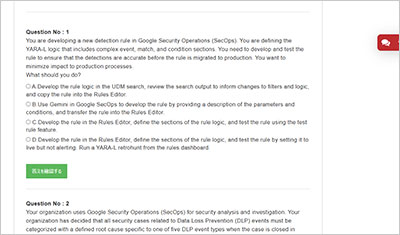
サンプル問題 1: You need to augment your organization's existing Security Command Center (SCC) implementation with additional detectors. You have a list of known IoCs and would like to include external signals for this capability to ensure broad detection coverage. What should you do?
A: Create a custom posture for your organization that combines the prebuilt Event Threat Detection and Security Health Analytics (SHA) detectors.
B: Create a Security Health Analytics (SHA) custom module using the compute address resource.
C: Create an Event Threat Detection custom module using the "Configurable Bad IP" template.
D: Create a custom log sink with internal and external IP addresses from threat intelligence. Use the SCC API to generate a finding for each event.
正解:C
Explanation: Comprehensive and Detailed 150 to 250 words of Explanation From Exact Extract Google Security Operations Engineer documents: The correct solution is to create an Event Threat Detection (ETD) custom module. ETD is the Security Command Center (SCC) service designed to analyze logs for active threats, anomalies, and malicious behavior. The user's requirement is to use a list of known Indicators of Compromise (IoCs) and external signals, which directly aligns with the purpose of ETD. In contrast, Security Health Analytics (SHA), mentioned in options A and B, is a posture management service. SHA custom modules are used to detect misconfigurations and vulnerabilities in resource settings, not to analyze log streams for threat activity based on IoCs. Event Threat Detection provides pre-built templates for creating custom modules to simplify the detection engineering process. The "Configurable Bad IP" template is specifically designed for this exact use case. It allows an organization to upload and maintain a list of known malicious IP addresses (a common form of external IoC). ETD will then continuously scan relevant log sources, such as VPC Flow Logs, Cloud DNS logs, and Cloud NAT logs. If any activity to or from an IP address on this custom list is detected, ETD automatically generates a CONFIGURABLE_BAD_IP finding in Security Command Center for review and response. This approach is the native, efficient, and supported method for integrating IP-based IoCs into SCC, unlike option D which requires building a complex, manual pipeline. (Reference: Google Cloud documentation, "Overview of Event Threat Detection custom modules"; "Using Event Threat Detection custom module templates")
サンプル問題 2: You have identified a common malware variant on a potentially infected computer. You need to find reliable IoCs and malware behaviors as quickly as possible to confirm whether the computer is infected and search for signs of infection on other computers. What should you do?
A: Search for the malware hash in Google Threat Intelligence, and review the results.
B: Run a Google Web Search for the malware hash, and review the results.
C: Create a Compute Engine VM, and perform dynamic and static malware analysis.
D: Perform a UDM search for the file checksum in Google Security Operations (SecOps). Review activities that are associated with, or attributed to, the malware.
正解:A
Explanation: Comprehensive and Detailed 150 to 250 words of Explanation From Exact Extract Google Security Operations Engineer documents: The correct answer is A. The most effective and reliable method for a security engineer to "find reliable IoCs and malware behaviors" is to use Google Threat Intelligence (GTI). When a known indicator like a file hash is identified, the primary workflow is threat enrichment. Google Threat Intelligence, which is a core component of the Google SecOps platform and incorporates intelligence from Mandiant and VirusTotal, is the dedicated tool for this. Searching the hash in GTI provides a comprehensive report on the malware variant, including all associated reliable IoCs (e.g., C2 domains, IP addresses, related file hashes) and malware behaviors (TTPs, attribution, and context). This directly fulfills the user's need. In contrast, Option D (UDM search) is the subsequent step. A UDM search is used to hunt for indicators within your own organization's logs. An engineer would first use GTI to gather the full list of IoCs and behaviors, and then use UDM search to hunt for all of those indicators across their environment. Option B (Web Search) is unreliable for professional operations, and Option C (manual analysis) is too slow for a "common malware variant" and the need to act "quickly." (Reference: Google Cloud documentation, "Google Threat Intelligence overview"; "Investigating threats using Google Threat Intelligence"; "View IOCs using Applied Threat Intelligence")
サンプル問題 3: You scheduled a Google Security Operations (SecOps) report to export results to a BigQuery dataset in your Google Cloud project. The report executes successfully in Google SecOps, but no data appears in the dataset. You confirmed that the dataset exists. How should you address this export failure?
A: Grant the Google SecOps service account the roles/iam.serviceAccountUser IAM role to itself.
B: Set a retention period for the BigQuery export.
C: Grant the user account that scheduled the report the roles/bigquery.dataEditor IAM role on the project.
D: Grant the Google SecOps service account the roles/bigquery.dataEditor IAM role on the dataset.
正解:D
Explanation: Comprehensive and Detailed 150 to 250 words of Explanation From Exact Extract Google Security Operations Engineer documents: This is a standard Identity and Access Management (IAM) permission issue. When Google Security Operations (SecOps) exports data, it uses its own service account (often named service-<project_number>@gcp-sa-bigquerydatatransfer.iam.gserviceaccount.com or a similar SecOps-specific principal) to perform the write operation. The user account that schedules the report (Option C) is only relevant for the scheduling action, not for the data transfer itself. For the export to succeed, the Google SecOps service account principal must have explicit permission to write data into the target BigQuery dataset. The predefined IAM role roles/bigquery.dataEditor grants the necessary permissions to create, update, and delete tables and table data within a dataset. By granting this role to the Google SecOps service account on the specific dataset, you authorize the service to write the report results and populate the tables. Option A (serviceAccountUser) is incorrect as it's used for service account impersonation, not for granting data access. Option B (retention period) is a data lifecycle setting and has no impact on the ability to write new data. The most common cause for this exact scenario―a successful job run with no data appearing―is that the service account lacks the required bigquery.dataEditor permissions on the destination dataset. (Reference: Google Cloud documentation, "Troubleshoot transfer configurations"; "Control access to resources with IAM"; "BigQuery predefined IAM roles")
Google Security Operations Engineer試験の準備に向けた復習資料としてSecurity Operations Engineer問題集を提供しています。Google Cloud Certified - Professional Security Operations Engineer (PSOE) Exam試験の主要な知識ポイントをカバーしています。ページ上部の「Security Operations Engineer 試験を開始する」ボタンからオンライン無料サンプル問題を確認できます。