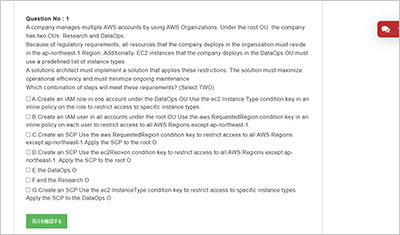
サンプル問題 1: A company is running a traditional web application on Amazon EC2 instances. The company needsto refactor the application as microservices that run on containers. Separate versions of the application exist in two distinct environments: production and testing. Load for the application is variable, but the minimum load and the maximum load are known. A solutions architect needs to design the updated application with a serverless architecture that minimizes operational complexity. Which solution will meet these requirements MOST cost-effectively?
A: Upload the container images to AWS Lambda as functions. Configure a concurrency limit for the associated Lambda functions to handle the expected peak load. Configure two separate Lambda integrations within Amazon API Gateway: one for production and one for testing.
B: Upload the container images to Amazon Elastic Container Registry (Amazon ECR). Configure two auto scaled Amazon Elastic Container Service (Amazon ECS) clusters with the Fargate launch type to handle the expected load. Deploy tasks from the ECR images. Configure two separate Application Load Balancers to direct traffic to the ECS clusters.
C: Upload the container images to Amazon Elastic Container Registry (Amazon ECR). Configure two auto scaled Amazon Elastic Kubernetes Service (Amazon EKS) clusters with the Fargate launch type to handle the expected load. Deploy tasks from the ECR images. Configure two separate Application Load Balancers to direct traffic to the EKS clusters.
D: Upload the container images to AWS Elastic Beanstalk. In Elastic Beanstalk, create separate environments and deployments for production and testing. Configure two separate Application Load Balancers to direct traffic to the Elastic Beanstalk deployments.
正解:B
Explanation: minimizes operational + microservices that run on containers = AWS Elastic Beanstalk
サンプル問題 2: A company has a multi-tier web application that runs on a fleet of Amazon EC2 instances behind an Application Load Balancer (ALB). The instances are in an Auto Scaling group. The ALB and the Auto Scaling group are replicated in a backup AWS Region. The minimum value and the maximum value for the Auto Scaling group are set to zero. An Amazon RDS Multi-AZ DB instance stores the application’s data. The DB instance has a read replica in the backup Region. The application presents an endpoint to end users by using an Amazon Route 53 record. The company needs to reduce its RTO to less than 15 minutes by giving the application the ability to automatically fail over to the backup Region. The company does not have a large enough budget for an active-active strategy. What should a solutions architect recommend to meet these requirements?
A: Reconfigure the application’s Route 53 record with a latency-based routing policy that load balances traffic between the two ALBs. Create an AWS Lambda function in the backup Region to promote the read replica and modify the Auto Scaling group values. Create an Amazon CloudWatch alarm that is based on the HTTPCode_Target_5XX_Count metric for the ALB in the primary Region. Configure the CloudWatch alarm to invoke the Lambda function.
B: Create an AWS Lambda function in the backup Region to promote the read replica and modify the Auto Scaling group values. Configure Route 53 with a health check that monitors the web application and sends an Amazon Simple Notification Service (Amazon SNS) notification to the Lambda function when the health check status is unhealthy. Update the application’s Route 53 record with a failover policy that routes traffic to the ALB in the backup Region when a health check failure occurs.
C: Configure the Auto Scaling group in the backup Region to have the same values as the Auto Scaling group in the primary Region. Reconfigure the application’s Route 53 record with a latency-based routing policy that load balances traffic between the two ALBs. Remove the read replica. Replace the read replica with a standalone RDS DB instance. Configure Cross-Region Replicationbetween the RDS DB instances by using snapshots and Amazon S3.
D: Configure an endpoint in AWS Global Accelerator with the two ALBs as equal weighted targets. Create an AWS Lambda function in the backup Region to promote the read replica and modify the Auto Scaling group values. Create an Amazon CloudWatch alarm that is based on the HTTPCode_Target_5XX_Count metric for the ALB in the primary Region. Configure the CloudWatch alarm to invoke the Lambda function.
正解:B
Explanation: an AWS Lambda function in the backup region to promote the read replica and modify the Auto Scaling group values, and then configuring Route 53 with a health check that monitors the web application and sends an Amazon SNS notification to the Lambda function when the health check status is unhealthy. Finally, the application's Route 53 record should be updated with a failover policy that routes traffic to the ALB in the backup region when a health check failure occurs. This approach provides automatic failover to the backup region when a health check failure occurs, reducing the RTO to less than 15 minutes. Additionally, this approach is cost-effective as it does not require an active-active strategy.
サンプル問題 3: A company is hosting a critical application on a single Amazon EC2 instance. The application uses an Amazon ElastiCache for Redis single-node cluster for an in-memory data store. The application uses an Amazon RDS for MariaDB DB instance for a relational database. For the application to function, each piece of the infrastructure must be healthy and must be in an active state. A solutions architect needs to improve the application's architecture so that the infrastructure can automatically recover from failure with the least possible downtime. Which combination of steps will meet these requirements? (Select THREE.)
A: Use an Elastic Load Balancer to distribute traffic across multiple EC2 instances. Ensure that the EC2 instances are part of an Auto Scaling group that has a minimum capacity of two instances.
B: Use an Elastic Load Balancer to distribute traffic across multiple EC2 instances Ensure that the EC2 instances are configured in unlimited mode.
C: Modify the DB instance to create a read replica in the same Availability Zone. Promote the read replica to be the primary DB instance in failure scenarios.
D: Modify the DB instance to create a Multi-AZ deployment that extends across two Availability Zones.
E: Create a replication group for the ElastiCache for Redis cluster. Configure the cluster to use an Auto Scaling group that has a minimum capacity of two instances.
F: Create a replication group for the ElastiCache for Redis cluster. Enable Multi-AZ on the cluster.
正解:A, D, F
Explanation: Option A is correct because using an Elastic Load Balancer and an Auto Scaling group with a minimum capacity of two instances can improve the availability and scalability of the EC2 instances that host the application. The load balancer can distribute traffic across multiple instances and the Auto Scaling group can replace any unhealthy instances automatically1 Option D is correct because modifying the DB instance to create a Multi-AZ deployment that extends across two Availability Zones can improve the availability and durability of the RDS for MariaDB database. Multi-AZ deployments provide enhanceddata protection and minimize downtime by automatically failing over to astandby replica in another Availability Zone in case of a planned or unplanned outage4 Option F is correct because creating a replication group for the ElastiCache for Redis cluster and enabling Multi-AZ on the cluster can improve the availability and fault tolerance of the in-memory data store. A replication group consists of a primary node and up to five read-only replica nodes that are synchronized with the primary node using asynchronous replication. Multi-AZ allows automatic failover to one of the replicas if the primary node fails or becomes unreachable6 Reference: 1: https://docs.aws.amazon.com/elasticloadbalancing/latest/userguide/how-elastic-load-balancing-works.html 2: https://docs.aws.amazon.com/AWSEC2/latest/UserGuide/burstable-performance-instances-unlimited-mode.html 3: https://docs.aws.amazon.com/AmazonRDS/latest/UserGuide/USER_ReadRepl.html 4: https://docs.aws.amazon.com/AmazonRDS/latest/UserGuide/Concepts.MultiAZ.html 5: https://docs.aws.amazon.com/AmazonElastiCache/latest/red-ug/AutoScaling.html 6: https://docs.aws.amazon.com/AmazonElastiCache/latest/red-ug/Replication.Redis.Groups.html