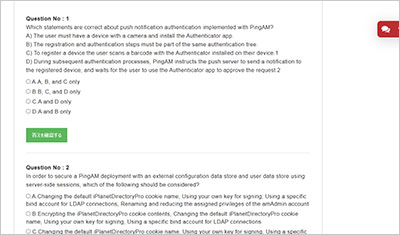
サンプル問題 1: In the default Cloud Developer Kit (CDK) deployment of the forgeops repository, which pods provide the user interface functionality?
A: admin-ui, end-user-ui, login-ui
B: amadmin-ui, idmadmin-ui, login-ui
C: am-ui, idm-ui, login-ui
D: am-ui, idm-ui, end-user-ui
正解:A
Explanation: The Cloud Developer Kit (CDK), part of the forgeops repository, represents the modern approach to deploying the Ping Identity Platform (including PingAM 8.0.2) in a containerized, Kubernetes-native environment. According to the PingAM deployment and ForgeOps documentation, the platform has transitioned from a monolithic architecture―where the user interface was embedded within the AM web application―to a decoupled, microservices-aligned architecture. In a standard CDK deployment, the user interface components are separated into their own distinct pods to allow for independent scaling, updates, and management. The three specific pods that provide user interface functionality in a default CDK environment are: admin-ui: This pod hosts the administrative console. It is the centralized interface that administrators use to configure realms, manage identity stores, define authentication trees, and oversee the general health of both PingAM and PingIDM. By separating the administrative UI from the core engine, the platform reduces the attack surface and allows for more granular resource allocation. end-user-ui: This pod serves the self-service portal for end-users. It is responsible for providing the interface where users can manage their own profiles, update passwords, register Multi-Factor Authentication (MFA) devices, and manage their consent for OAuth2/UMA applications. This UI interacts with the back-end via REST APIs to ensure a seamless and responsive user experience. login-ui: This is a specialized pod dedicated to the authentication journey. When a user interacts with an "Intelligent Access" tree, the login-ui pod renders the callbacks (such as username prompts, password fields, or MFA challenges). This pod ensures that the presentation layer of the authentication process is modernized and distinct from the heavy processing logic of the PingAM core. Collectively, these three pods ensure that the "User Interface" layer of the deployment is modular. This architecture is a prerequisite for high-availability deployments and is the standard configuration verified in the ForgeOps documentation for version 8.0.2 deployments
サンプル問題 2: A user enters their credentials, but is faced with the error message "user requires profile to login". What is a possible cause of this message?
A: Policies have not been defined to allow a user to access their profile page
B: The realm has not been set to user profile ignore mode
C: The user has not filled in the required information in their profile
D: The user has not entered the correct credentials
正解:B
Explanation: This error message is directly related to the User Profile configuration within a specific realm in PingAM 8.0.2. In the "Core Authentication Attributes" of a realm, PingAM defines how it should handle user identities after they have successfully provided valid credentials through an authentication tree or chain. There are primarily four modes for the User Profile setting: Required: This is often the default. It specifies that after a user successfully authenticates, PingAM must be able to locate a corresponding user entry in the configured Identity Store. If the user exists in the datastore, the session is created. If the user does not exist, authentication fails with the error message "user requires profile to login" (or a similar profile-related exception in the logs). Ignored: In this mode, PingAM issues an SSO session token immediately upon successful credential validation, regardless of whether a user profile exists in the back-end repository. This is useful for temporary or guest access where no permanent record is needed. Dynamic: AM attempts to find the user; if the user is not found, it automatically creates a new profile in the identity store. Dynamic with User Alias: Similar to dynamic creation but supports aliasing. If an administrator sees the "user requires profile to login" error, it confirms that the credentials themselves were technically correct (the user passed the authentication nodes), but the realm is currently in Required mode (it has not been set to Ignore or Dynamic) and no matching entry exists in the identity store. This frequently happens in migration scenarios or when using external identity providers (like Social IDPs) where the "Link" or "Provisioning" step has not been properly configured in the authentication journey. To resolve this, the administrator must either pre-provision the user, set the mode to Ignore, or implement a Create Object node within the authentication tree to handle dynamic provisioning.
サンプル問題 3: When a user undergoes a session upgrade, what is the outcome?
A: A new session is created, and the original session is deleted
B: The session properties are copied to a new session, and a new session token is handed to the client
C: The session is updated with new properties, but the session token remains the same
D: A new session is created, and the original session properties are not copied
正解:B
Explanation: Session Upgrade in PingAM 8.0.2 is the mechanism by which a user’s current authenticated session is "elevated" to a higher authentication level (Auth Level). This is commonly triggered by Step-up Authentication requirements, where a user attempts to access a highly sensitive resource that requires a stronger authentication method (such as MFA) than what was used for their initial login. According to the PingAM documentation on "Session Upgrade Outcomes," the process is not merely a modification of the existing session. Instead, when a user successfully completes the additional authentication requirements (the "Advice"): Creation of a New Session: PingAM generates a brand-new authenticated session. This new session is assigned a higher authentication level corresponding to the tree or module just completed. Property Copying: To ensure a seamless user experience, PingAM copies the session properties (attributes, constants, and other metadata) from the original lower-level session into the new higher-level session. This ensures that information gathered during the initial login remains available to applications. Token Replacement: Because the session ID is part of the session token (SSO Token), a new session implies a new token. PingAM hands the client a new session token to replace the original one. The client (browser or application) must then use this new token for subsequent requests. If the realm is configured for server-side sessions, the new session is stored in the Core Token Service (CTS). If configured for client-side sessions, a new signed/encrypted JWT is sent to the client as a cookie. The key distinction is that the token changes, and properties are preserved through copying, which distinguishes Option B as the correct technical description of the internal AM lifecycle.
試験はこの世界で成功しやすいことの一つです。試験は前もって範囲を教えていますから、復習はこの範囲内の自分ができないところを探し続けています。GOWUKAKUはPT-AM-CPE問題集を用いたPT-AM-CPE(Certified Professional - PingAM Exam)試験の復習方法を案内しています。