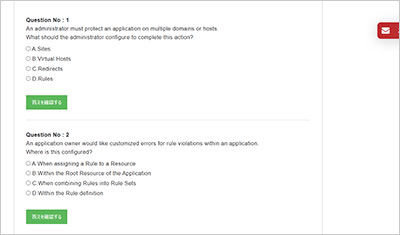
サンプル問題 1: An administrator is setting up a new PingAccess cluster with the following: • Administrative node hostname: pa-admin.company.com • Replica administrative node hostname: pa-admin2.company.com Which two options in the certificate would be valid for the administrative node key pair? (Choose 2.)
A: Issuer = pa-admin.company.com
B: Subject = *.company.com
C: Subject = pa-admin.company.com
D: Subject Alternative Names = pa-admin.company.com, pa-admin2.company.com
E: Subject = pa-admin2.company.com
正解:B, D
Explanation: Exact Extract (from PingAccess documentation): “The key pair that you create for the CONFIG QUERY listener must include both the administrative node and the replica administrative node. To make sure the replica administrative node is included, you can either use a wildcard certificate or define subject alternative names in the key pair that use the replica administrative node’s DNS name.” Why B and D are correct: *B. Subject = .company.com ― A wildcard certificate for *.company.com is valid for both pa-admin.company.com and pa-admin2.company.com, satisfying the documented requirement that the key pair include both hostnames for the CONFIG QUERY listener. D. Subject Alternative Names = pa-admin.company.com, pa-admin2.company.com ― Explicitly placing both DNS names in the SAN extension also satisfies the requirement that the certificate cover both the administrative node and the replica administrative node. Why the other options are incorrect: A. Issuer = pa-admin.company.com ― The Issuer field identifies the certificate authority (CA) that signed the certificate, not the service hostname. Setting the issuer to a host value is not how X.509 server certificates are validated and would not meet the hostname matching requirement. C. Subject = pa-admin.company.com ― While this covers the administrative node, it does not include the replica administrative node. Without a wildcard or SAN entries, it fails the requirement that the key pair include both hostnames. E. Subject = pa-admin2.company.com ― Similarly, this would only cover the replica administrative node and not the primary administrative node, failing the requirement. Reference: Configuring replica administrative nodes (PingAccess User Interface Reference Guide) Configuring a PingAccess cluster (PingAccess documentation) Certificates (PingAccess User Interface Reference Guide)
サンプル問題 2: An organization wants to take advantage of a new product feature that requires upgrading the PingAccess cluster from 7.3 to the current version. The administrator downloads the required files and places the files on the PingAccess servers. What should the administrator do next?
A: Upgrade the Admin Console.
B: Disable cluster communication.
C: Disable Key Rolling.
D: Upgrade the Replica Admin.
正解:A
Explanation: When upgrading a PingAccess cluster, the Admin Console node must always be upgraded first before any replica admin or engine nodes. This ensures that the configuration and schema changes introduced in the new version are properly applied and replicated. Exact Extract (from PingAccess documentation): “In a clustered environment, you must first upgrade the administrative console node before upgrading any replica administrative nodes or engine nodes.” Why A is correct: A. Upgrade the Admin Console ― This is correct because the admin console node acts as the configuration master in a PingAccess cluster. Upgrading it first ensures the new version schema is available to replicas and engines. Why the other options are incorrect: B. Disable cluster communication ― This is not required for standard upgrades. Cluster communication remains in place to synchronize changes after the upgrade. C. Disable Key Rolling ― Key rolling is unrelated to the upgrade process. It is a feature used for key rotation, not version upgrades. D. Upgrade the Replica Admin ― This is incorrect because upgrading a replica admin before the primary administrative console is against the documented procedure and would cause replication issues. Reference: Upgrading PingAccess in a Clustered Environment (PingAccess Upgrade Guide) PingAccess Administration Guide C Upgrade Process
サンプル問題 3: Where in the administrative console should an administrator make user attributes available as HTTP request headers?
A: Site Authenticators
B: Identity Mappings
C: Web Sessions
D: HTTP Requests
正解:B
Explanation: PingAccess uses Identity Mappings to take identity attributes provided by the authentication source (e.g., PingFederate, OpenID Connect) and map them into HTTP request headers for back-end applications. Exact Extract: “An identity mapping allows you to map identity attributes from the user’s session to HTTP headers, cookies, or query parameters that are then forwarded to the target application.” Option A (Site Authenticators) is incorrect because Site Authenticators configure how PingAccess communicates with applications requiring authentication, not how attributes are inserted into headers. Option B (Identity Mappings) is correct ― this is the feature designed specifically to expose user attributes to applications via HTTP headers. Option C (Web Sessions) manages how sessions are stored and validated, but not the mapping of attributes into requests. Option D (HTTP Requests) refers to request/response processing rules, but attributes are not mapped here. Reference: PingAccess Administration Guide C Identity Mapping
GOWUKAKUのPAP-001問題集は、Ping Identity Certified Professional - PingAccess認定試験の準備に向けた復習用問題集です。PAP-001問題集を使用して出題形式を確認し、知識の定着度を確認しながら復習を進めることができます。