サンプル問題 1: What is the default amount of time that a volume is available for recovery from the volume recovery queue following a volume deletion?
A: 12 hours
B: 48 hours
C: 72 hours
D: 24 hours
正解:A
Explanation: When a volume is deleted in a NetApp ONTAP system, it is placed in the Volume Recovery Queue. By default, the volume remains in this recovery queue for 12 hours before being permanently deleted. This allows administrators to recover mistakenly deleted volumes within the set retention period. Explanation of Default Behavior: Volume Recovery Queue: This is a feature in NetApp ONTAP that acts as a safety mechanism, providing a grace period for recovering deleted volumes. The default retention period for volumes in the recovery queue is 12 hours, as confirmed by the NetApp KB: "How to use the Volume Recovery Queue." How to Recover a Deleted Volume: Administrators can recover a deleted volume as long as it remains in the recovery queue and the retention period has not expired. Use the ONTAP CLI command: arduino Copy code cluster::> volume recovery-queue recover -vserver <vserver_name> -volume <volume_name> This command restores the volume back to its original state. How to Check the Volume Recovery Queue: To view volumes in the recovery queue and their expiration times, use: arduino Copy code cluster::> volume recovery-queue show Changing the Default Retention Period: While the default period is 12 hours, it can be adjusted by administrators to fit specific organizational requirements. This is done via system settings or policies. Why the Other Options Are Incorrect: B. 48 hours: Incorrect. The default retention period is not 48 hours; it is 12 hours by default. C. 72 hours: Incorrect. While a custom configuration could allow this, it is not the default. D. 24 hours: Incorrect. Although this was previously thought to be the default, NetApp documentation explicitly states it is 12 hours. Reference: NetApp Knowledge Base Article: "How to use the Volume Recovery Queue". NetApp ONTAP Documentation: Volume Recovery and Data Management Procedures.
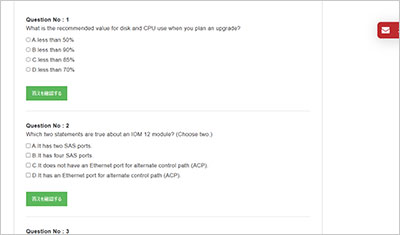
サンプル問題 2: Which two statements regarding drive 1.2.3.L1 are true? (Choose two.)
A: The drive is in shelf 2.
B: The drive is in bay 3.
C: The drive is in bay 2.
D: The drive is in shelf 1.
正解:A, B
Explanation: The identifier 1.2.3.L1 follows the NetApp disk naming convention, which specifies the location of the drive in the system. Here is the breakdown of the identifier: 1: This indicates the stack ID or loop ID. It represents the stack number in the disk shelf configuration. 2: This indicates the shelf ID. In this case, the drive is located in shelf 2. 3: This indicates the bay ID or slot number within the shelf. The drive is in bay 3. L1: This represents the logical port or logical disk identifier. How to Interpret Disk Identifier 1.2.3.L1: The shelf ID is 2, so the drive is in shelf 2 (A is correct). The bay ID is 3, so the drive is in bay 3 (B is correct). Why Other Options Are Incorrect: C. The drive is in bay 2: The bay ID is explicitly specified as 3, not 2. D. The drive is in shelf 1: The shelf ID is clearly given as 2, not 1. Reference: NetApp Hardware Universe documentation provides details on disk naming conventions. The "ONTAP Disk Management Guide" includes a full explanation of disk IDs and their interpretation.
サンプル問題 3: Where is a kernel core file stored on a FAS9000 system that is running ONTAP 9.12.1 software?
A: on the partner root aggregate
B: on the root aggregate
C: on the mailbox disk
D: on the boot device
正解:B
Explanation: On a FAS9000 system running ONTAP 9.12.1, the kernel core file is stored on the root aggregate. This is the default location where ONTAP writes kernel core files for system-level failures. Key Details: The root aggregate is the aggregate that contains the root volume for a given node in the cluster. This aggregate is used for critical system files and logs, including kernel core files. When a kernel panic or other critical failure occurs, the core dump is written to the root aggregate for later analysis by NetApp Support. Why Other Options Are Incorrect: A. on the partner root aggregate: The partner root aggregate is not used for storing core files unless explicitly configured (which is not the default behavior). C. on the mailbox disk: The mailbox disk is used for cluster quorum and configuration information, not for storing core files. D. on the boot device: The boot device contains ONTAP software and boot files but does not store kernel core dumps. Reference: "ONTAP System Administration Guide" specifies that core files are stored on the root aggregate. NetApp’s "Troubleshooting and Diagnostics Guide" confirms the default behavior for kernel core file storage.
試験はこの世界で成功しやすいことの一つです。試験は前もって範囲を教えていますから、復習はこの範囲内の自分ができないところを探し続けています。GOWUKAKUはNS0-094問題集を用いたNS0-094(NetApp Hardware Support Engineer Professional Exam)試験の復習方法を案内しています。