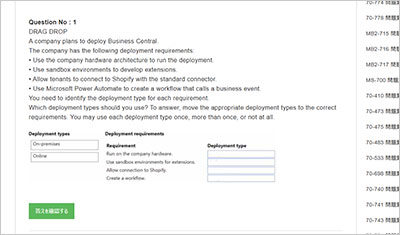
サンプル問題 1: You need to define the data types for the fields of the N on-conformity table. Which two data types should you use? Each correct answer presents part of the solution. NOTE: Each correct selection is worth one point.
A: Integer for the N on-conformity Number field
B: Date Time for the Non-Conformity Date field
C: Char for the Non-Conformity Number field
D: Date for the Non-Conformity Date field
E: Code for the Non-Conformity Number field
正解:A, D, E
Explanation: In Business Central, fields in tables are assigned specific data types that determine the kind of data they can store. For the Non-conformity table mentioned in the case study, the following data types should be used: Date for the Non-Conformity Date field: This is because the Non-conformity Date field is required to store only the date when the non-conformity was recorded. The Date data type is appropriate for storing dates without times. Code for the Non-Conformity Number field: The Non-conformity Number field is described to use alphanumeric values with a format that includes "NC" and the year, like "NC24-001". In Business Central, the Code data type is used for fields that store alphanumeric keys. It is a text field with a limited length, which makes it suitable for number series that contain letters and numbers. Other options are not suitable: A. Integer for the Non-conformity Number field: This would not be appropriate because the Non-conformity Number includes alphanumeric characters and not just integers. B. Date Time for the Non-Conformity Date field: This is not correct because there is no requirement to store the time alongside the date. C. Char for the Non-Conformity Number field: Char data type is not typically used in Business Central for number series or identifiers. The Code data type is preferred for this purpose.
サンプル問題 2: You need to determine why the debugger does not start correctly. What is the cause of the problem?
A: The "userld" parameter must have the GUID of the user specified, not the username.
B: The "breakOnNext" parameter is not set to -WebServiceClient".
C: The "userld" parameter is specified, and the next user session that is specified in the 'breakOnNext" parameter is snapshot debugged.
D: The "executionContext* parameter is not set to "Debug".
正解:A
Explanation: In Microsoft Dynamics 365 Business Central, when configuring snapshot debugging, it is crucial that the parameters in the configuration file are correctly set. From the options provided, the issue with the debugger not starting correctly is most likely due to an incorrect "userId" parameter. Option A is the cause of the problem. The "userId" parameter must be the GUID of the user, not the username. The snapshot debugger needs the exact GUID to attach to the right session for debugging. Option B is incorrect because "breakOnNext" set to "WebClient" is a valid setting. This tells the debugger to break on the next client action in the web client, which is a typical scenario. Option C is not the cause of the problem. The "userId" parameter is meant to specify which user session to debug, and this works in conjunction with the "breakOnNext" parameter. Option D is incorrect as the "executionContext" parameter does not need to be set to "Debug" for snapshot debugging to work. "DebugAndProfile" is a valid value for the "executionContext" parameter, as it allows for debugging and collecting performance information. Therefore, the reason why the debugger does not start correctly is due to Option A: The "userId" parameter must have the GUID of the user specified, not the username.
サンプル問題 3: Topic 3, Misc. Questions You are developing an app that will be published to Microsoft AppSource. The app requires code analyzers to enforce some rules. You plan to add the analyzers to the settings.json file. You need to activate the analyzers for the project. Which three code analyzers should you activate to develop the app for AppSource? Each correct answer presents part of the solution. NOTE: Each correct selection is worth one point.
A: CodeCop
B: UlCop
C: a custom rule set
D: PerTenantExtensionCop
E: AppSourceCop
正解:A, D, E
Explanation: When developing an app for Microsoft AppSource, it is crucial to adhere to specific guidelines and standards to ensure compatibility and compliance. The three code analyzers you should activate are: CodeCop (A): This is the default analyzer for AL language extensions. It enforces the AL Coding Guidelines, ensuring that the code follows best practices for readability, maintainability, and performance. It checks for a wide range of issues, from syntax errors to best practice violations, making it essential for any AL development. PerTenantExtensionCop (D): This analyzer is specifically designed for extensions that are intended to be installed for individual tenants. It includes rules that ensure the extension does not interfere with the per-tenant customizations and adheres to the guidelines for extensions that can be safely installed and uninstalled without affecting the underlying application. AppSourceCop (E): This analyzer is tailored for extensions that are intended for publication on Microsoft AppSource. It enforces additional rules that are specific to AppSource submissions, such as checking for the use of reserved object ranges and ensuring that all prerequisite dependencies are correctly declared. This is crucial for ensuring that your app meets all the requirements for listing on AppSource. By activating these three analyzers, developers can ensure their app adheres to the standards required for AppSource, as well as maintain high code quality and compatibility with Business Central.
Microsoft MB-820試験の準備に向けた復習資料としてMB-820問題集を提供しています。Microsoft Dynamics 365 Business Central Developer試験の主要な知識ポイントをカバーしています。ページ上部の「MB-820 試験を開始する」ボタンからオンライン無料サンプル問題を確認できます。
MB-820問題集の収録内容と更新状況はどうなっていますか?
答え:現在提供されているMB-820問題集には、MB-820試験対策に向けた全56問の練習問題と解答が収録されています。Microsoft Dynamics 365 Business Central Developer試験に向けた復習に利用できます。