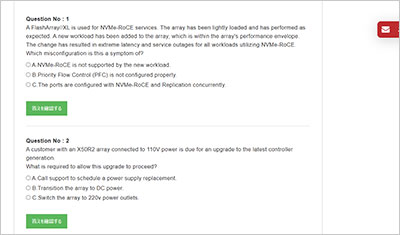
サンプル問題 1: A new array is directly connected to a host with Direct Attach Copper (DAC) cables. The link does not come up. Which document can be used to help identify the issue?
A: The FlashArray User Guide
B: FlashArray Transceiver and Cable Support article
C: The Port Usage and Definitions article
正解:B
Explanation: When physical links fail to establish―especially when using Direct Attach Copper (DAC) cables or Twinax―the most common culprit is a hardware compatibility mismatch. Pure Storage arrays have specific requirements for optics and cabling to ensure optimal signal integrity and performance. The FlashArray Transceiver and Cable Support article (available on the Pure Storage Support portal) is the authoritative, verified resource for this scenario. It provides a comprehensive, constantly updated compatibility matrix detailing exactly which vendor DAC cables (e.g., Cisco, Brocade, Arista) and transceivers are officially validated and supported for use with specific FlashArray models and port types. If an unsupported DAC cable is used, the switch or host bus adapter (HBA) on the array might simply refuse to bring the link up. Here is why the other options are incorrect for this specific issue: The FlashArray User Guide (A): This guide is excellent for day-to-day administration (volume creation, host grouping, etc.) but is too broad to contain granular, constantly updating hardware compatibility matrices for specific cables. The Port Usage and Definitions article (C): This document explains the logical and physical purpose of the ports on the back of the controllers (e.g., defining which ports are used for management, replication, or host connectivity), but it does not dictate hardware transceiver or cable interoperability
サンプル問題 2: When is it possible to simulate snapshot policies in the Pure1 Snapshot Policies (SafeMode)?
A: When a FlashArray has existing snapshots
B: When a FlashArray does not have existing snapshots
C: When a FlashArray has an existing saved workload simulation
正解:A
Explanation: In Pure1, the ability to simulate snapshot policies―particularly when assessing the capacity requirements and impact of enabling SafeMode―heavily relies on historical telemetry data. Pure1 uses the data from existing snapshots on the FlashArray to calculate the environment's daily data change rate, as well as the deduplication and compression ratios specific to those workloads. By analyzing the footprint of existing snapshots, Pure1's analytics engine can accurately project the future storage capacity required if you were to change your snapshot frequency or extend the retention period (for example, locking them down for 7 to 30 days under a SafeMode policy). If a FlashArray does not have any existing snapshots, Pure1 lacks the foundational baseline metrics needed to simulate and forecast the capacity impact of a proposed snapshot policy.
サンプル問題 3: What command must an administrator run to use newly installed DirectFlash Modules (DFM)?
A: pureadmin -- admit-drive
B: purearray admit drive
C: puredrive admit
正解:C
Explanation: When new DirectFlash Modules (DFMs) or data packs are physically inserted into a Pure Storage FlashArray, the Purity operating environment detects the new hardware but places the drives in an "unadmitted" state. This safety mechanism prevents the accidental incorporation of drives and allows the system to verify the firmware and health of the modules before they are actively used to store data. To formally accept these drives into the system's storage pool so their capacity can be utilized, the administrator must execute the CLI command puredrive admit. Once this command is run, the drive status transitions from "unadmitted" to "healthy," and the array's usable capacity expands accordingly. Here is why the other options are incorrect: pureadmin -- admit-drive (A): This is syntactically incorrect. The pureadmin command suite is used for managing administrator accounts, API tokens, and directory services, not for hardware or drive management. purearray admit drive (B): This is also incorrect syntax. While purearray is used for array-wide settings and status (like renaming the array or checking space), specific drive-level operations are exclusively handled by the puredrive command structure.