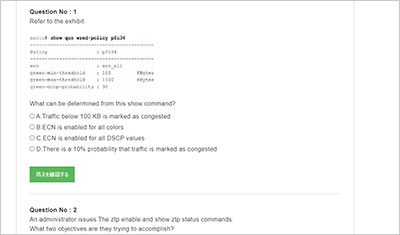
サンプル問題 1: What is the purpose of the write erase boot command option?
A: Delete the startup and enable zero touch provisioning.
B: Remove user-installed packages and tile changes.
C: Delete the startup configuration and the management interface configuration.
D: Delete the running configuration and all user accounts.
正解:A
Explanation: The write erase boot command option deletes the startup configuration and enables zero touch provisioning (ZTP). This is used to reset the switch to its default state and prepare it for automated configuration through ZTP. References: Dell Technologies SONiC Command Reference Guide Switch Configuration Guide
サンプル問題 2: Which network devices route unencapsulated user traffic in a symmetric IRB overlay network?
A: Source VTEP and destination VTEP
B: Leaf router and spine router
C: Capability extended next hop router and leaf router
D: Autonomous system boundary router and source VTEP
正解:A
Explanation: In a symmetric Integrated Routing and Bridging (IRB) overlay network, the Source Virtual Tunnel End Point (VTEP) and the Destination VTEP route unencapsulated user traffic. Symmetric IRB ensures that routing occurs at both the ingress and egress VTEPs, allowing for optimized traffic flow and efficient network operations. References: Dell Technologies SONiC documentation VXLAN Configuration Guide
サンプル問題 3: What interface must be selected when configuring the management port from within the MF-CLI environment?
A: mgmt 1/1/1
B: ma 0/1
C: Management 0
D: eth0
正解:D
Explanation: Dell SONiC Management Interface Configuration: In Dell SONiC, the management port configuration is a crucial aspect that allows administrators to access and manage the network device. The management interface typically provides out-of-band management access to the device, ensuring that even if the data network is down, the management network can still be accessed. Common Interface Naming Conventions: mgmt 1/1/1: This naming convention is not typically used in Dell SONiC environments for management interfaces. ma 0/1: This could be a potential naming convention but is not standard for Dell SONiC. Management 0: This is a logical name but does not align with the standard interface naming conventions used in Dell SONiC. eth0: This is the standard naming convention used for the primary management interface in most Linux-based systems, including Dell SONiC. Verification with Dell SONiC Documentation: Dell SONiC documentation specifies that the management interface is usually named eth0. When accessing the management interface within the MF-CLI (Management Framework Command Line Interface) environment, eth0 is the correct interface to configure. Practical Configuration Example: When configuring the management port, the command might look something like: config interface ip add eth0 <management_ip_address>/<subnet_mask> This command specifies the management interface eth0 and assigns it an IP address for network management purposes. References: Dell Enterprise SONiC Deployment Guide Dell Technologies Networking - SONiC This detailed step-by-step explanation confirms that the correct answer is D, providing insights into the typical interface naming conventions and configuration practices within the Dell SONiC environment.
DELL EMC D-SNC-DY-00試験準備をしていますか?それとも自分は全部できそうです。復習する必要がないと思いますか?それとも自分は何もできないような気がします。どうすればいいでしょうか?実は、この問題を解決するのは難しくないです。勉強者がやるべきのは分解分析をマスターすることです。ここではD-SNC-DY-00問題集を使って学習中の課題を確認し、知識を整理してDell SONiC Deploy Exam試験の準備を進めます。
その次に、非常規の試験ポイントのテーマは多すぎてこだわる必要はなくて、重要な試験点のテーマはきっと知識の点をわかります。特にDell SONiC Deploy Exam試験は試験資料ポイントが多いです。一つの問題は知識ポイントだけではなく、復習する時はまとめをマスターして、記憶を分類します。知識ポイントが覚えていないか、間違えていないかのために点数をなくしてはいけません。