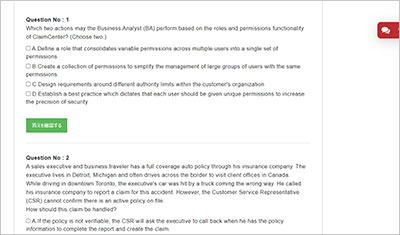
サンプル問題 1: A performing arts organization operates nationwide and is responsible for setting up stages for musical acts and concerts. The organization requires specific insurance coverage for its gear and equipment, including audio systems, lighting, cameras, and control boards. Succeed Insurance wants to optimize claim intake, processing, and reporting for this organization. Which modifications should be made to ClaimCenter’s base product line of business (LOB)?
A: The existing ClaimCenter standard LOB model can meet the company’s objectives without modifications.
B: Add relevant CoverageType code(s), Coverage Subtype code(s), and map ExposureType code(s) to support the new coverage.
C: Add new LossType code(s) and PolicyType code(s) to the LOB model to handle the organization’s coverage needs.
D: Add new Coverage Subtype code(s) with detailed information for each ExposureType code to the existing LOB model.
正解:B
Explanation: According to the Guidewire ClaimCenter Business Analyst documentation, ClaimCenter’s line of business (LOB) framework is intentionally designed to support extensibility through configuration rather than structural changes to core policy or loss classification elements. When an insurer needs to support specialized insured property―such as professional audio, lighting, and staging equipment―the recommended approach is to enhance the coverage configuration. ClaimCenter models policy coverage using a hierarchy of CoverageType and Coverage Subtype typelists. CoverageType codes represent high-level coverage categories defined by the policy, while Coverage Subtype codes allow insurers to further refine and classify coverage details. These coverage elements are then associated with ExposureType codes, which drive claim processing behavior such as exposure creation, reserving, payment handling, and reporting. By adding appropriate CoverageType and Coverage Subtype codes for equipment and gear coverage and mapping them to ExposureType codes, ClaimCenter can automatically create accurate exposures during claim intake. This approach ensures adjusters can efficiently process claims while maintaining consistent workflows and financial controls. It also supports meaningful analytics and reporting without altering the base product structure. The Guidewire documentation advises against introducing new LossType or PolicyType codes unless the insurer is defining an entirely new policy or loss classification. LossType codes describe how a loss occurred (for example, theft or accidental damage), not the nature of the insured property. PolicyType changes are similarly broad and unnecessary for extending coverage within an existing LOB. Therefore, option B aligns with Guidewire best practices by extending ClaimCenter’s coverage and exposure configuration to meet the organization’s needs while preserving the integrity of the standard LOB model
サンプル問題 2: When creating a new Personal Auto claim, Succeed Insurance would like to identify when Rideshare is the primary use for a vehicle. A Business Analyst (BA) thinks that Primary Use already exists as a typekey on the Vehicle Details screen. What are two ways the BA can confirm whether this field is configured in ClaimCenter and, if it is, which values are available in the typelist? (Choose two.)
A: Access the Data Dictionary > Click the Data Entities link > Open the PrimaryUse entity from left-hand pane to view field details on the right pane.
B: Access the Guidewire ClaimCenter Application Guide > Go to section on Personal Auto Object Model which lists available entities.
C: Log in to ClaimCenter > Create a new Personal Auto claim > Navigate to Vehicle Details > Use keyboard shortcut CTRL + F to find information about the fields on the screen.
D: Open Guidewire Studio for ClaimCenter > Navigate to the Vehicle Details screen > Locate the Primary Use field to view its typelist.
正解:A, D
Explanation: To verify the configuration of a specific field and its available values (typelist) within a specific implementation (like Succeed Insurance), a Business Analyst must consult the sources that reflect the current, actual system configuration, not just the out-of-the-box documentation. Option A (Data Dictionary): The Data Dictionary is the definitive, generated documentation of the running application's data model. It lists all Entities (such as Vehicle) and their Typekeys (such as PrimaryUse). By navigating to the Data Dictionary, a BA can confirm if the field exists in the database schema and view the specific Typelist values (e.g., "Rideshare", "Commuting", "Pleasure") associated with it. This is a primary tool for BAs to understand the data structure. Option D (Guidewire Studio): Guidewire Studio is the Integrated Development Environment (IDE) used to configure the application. It contains the "Source of Truth" for all configuration files. A BA (or a developer assisting them) can open the Page Configuration (PCF) files to see the Vehicle Details screen definition or open the Typelist files (.tti/.ttx) directly to see exactly which values are defined and active. Why other options are incorrect: Option B (Application Guide): The Application Guide documents the Base (Out-of-the-Box) product features. It does not contain customer-specific customizations or extensions. If "Primary Use" or "Rideshare" were added or modified by Succeed Insurance, the Application Guide would not reflect this. Option C (UI Inspection with CTRL+F): While logging into the application allows a user to see the dropdown on the screen, the shortcut CTRL + F is merely the browser's "Find" function. It searches visible text on the page but does not provide configuration metadata, hidden values, or definitive proof of the underlying data model structure. The correct shortcut for inspecting widget properties in Guidewire is Alt + Shift + I (Location Info), but even that is less efficient for viewing a full typelist than the Data Dictionary or Studio.
サンプル問題 3: A claim for an auto accident in California has been assigned to an insurance Adjuster in the Midwest region for investigation and processing. The claim has been flagged as "Low Complexity" in ClaimCenter. The Adjuster has an authority limit for total reserves of $30,000 and has created reserves totaling $35,000. What is the correct approval routing for this transaction?
A: This transaction will not require approval because the claim is identified as low complexity.
B: The transaction will require approval from another team member who has the authority limit to approve.
C: This transaction will require approval because the Adjuster does not work in the same region where the claim was reported.
D: The transaction will require approval from the Supervisor of the group.
正解:D
Explanation: Based on the Guidewire ClaimCenter Financials and Authority Limits documentation, the correct behavior for this scenario is determined by the strict enforcement of Authority Limits, regardless of claim complexity or geographic region. In ClaimCenter, every user is assigned specific authority limits for various financial transactions, including reserves, payments, and recovery reserves. These limits are absolute constraints designed to control financial exposure. In the scenario provided, the Adjuster attempted to set a reserve of $35,000, which exceeds their authorized limit of $30,000. When a user submits a financial transaction that exceeds their pre-configured authority limit, ClaimCenter automatically triggers an Approval Workflow. The system validates the transaction amount against the user's limit at the time of submission. Since the limit is breached, the transaction is not committed immediately to the database as "Submitted"; instead, it enters a "Pending Approval" status. Routing Logic: The standard, out-of-the-box approval routing logic in ClaimCenter follows the Group Hierarchy. The system identifies the group to which the Adjuster belongs. It creates an Approval Activity. This activity is assigned to the Supervisor of that group. The Supervisor must then review the transaction. If the Supervisor has sufficient authority (greater than $35,000), they can approve it. If the Supervisor also lacks sufficient authority, they must still "approve" it to escalate the request further up the hierarchy to their manager, until it reaches a user with sufficient limits. Why other options are incorrect: A (Complexity): Claim complexity flags (e.g., "Low Complexity") are often used for Assignment rules (Segment-based assignment) or straight-through processing of documents, but they do not override Financial Authority controls. A low-complexity claim still requires financial oversight if the dollar amount is high. B (Peer Approval): Approval routing is hierarchical, not peer-to-peer. It does not look for "any" team member; it looks specifically for the defined Supervisor. C (Region): The region mismatch might trigger an assignment rule or a validation warning depending on configuration, but the specific trigger for the approval here is purely the financial discrepancy ($35k > $30k), not the geography.
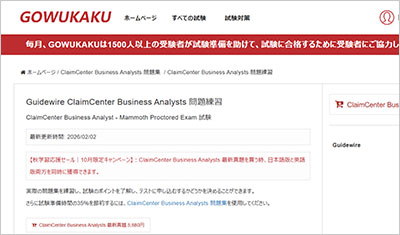
GOWUKAKUのClaimCenter Business Analysts問題集は、Guidewire ClaimCenter Business Analyst - Mammoth Proctored Exam認定試験の準備に向けた復習用問題集です。ClaimCenter Business Analysts問題集を使用して出題形式を確認し、知識の定着度を確認しながら復習を進めることができます。
ClaimCenter Business Analysts問題集を使用する正しい方法
ClaimCenter Business Analysts問題集を使用する正しい方法:間違いがない、または間違えた場合は、マークを付け、エラーの根本原因を見つけて統合し、習熟するまで確認します。
ClaimCenter Business Analysts試験に合格するには、主題の知識と試験のルールを習得する必要があります。そして、質問をせずに本を読んでビデオを見るだけでは、明らかに後者のことはできません。慎重に考えて要約することによってのみ、質問のルールを習得し、半分の労力で2倍の結果を得ることができます。
ClaimCenter Business Analysts問題集を使用して、より多くの試験の質問を行うことで研究の問題を見つけてください。そうすれば、より良くなることができます。
ClaimCenter Business Analysts試験の質問に関係することは当然可能です。繰り返しテストされる質問は、頻繁にテストされる質問です。質問に表示されないものは、テストされる可能性が最も低いものです。何度も何度もテストを受ける人は、当然、それを習得するために多くの時間とエネルギーを費やす必要があり、テストをあまり受けない人は、勉強する時間があるまで待つことができます。
ご入金後、マイページからClaimCenter Business Analysts試験問題集の日本語版と英語版の2言語セット(PDF形式)をダウンロードできます。また、試験範囲の改訂や問題集の更新が行われた場合、ご購入日から1年間(365日間)は更新版を追加料金なしでダウンロードできます。返金の条件は返金ポリシーに従います。