サンプル問題 1: When sharing a Dashboard, who can be granted Dashboard access?
A: A specific role
B: A specific user
C: A specific group
D: A specific user, group, or role
正解:D
Explanation: In Platform Analytics, dashboards are shared through the dashboard Share action. In the Share Dashboard dialog, the Grant access to field explicitly allows you to enter one or more users, groups, or roles to share the dashboard with. This sharing controls whether recipients can view the dashboard or edit it, depending on whether you add them as a viewer or editor. Sharing can also optionally allow recipients to manage (add/edit/remove) sharing permissions if that option is enabled. ServiceNow further notes that only certain privileged roles (such as admin, dashboard_admin, pa_admin, or pa_power_user) can see roles in the sharing panel in some configurations, and sharing with roles may require read access to the Roles [sys_user_role] table. This means access can be granted at the individual level (user), team level (group), or permission level (role), making “user, group, or role” the correct and complete choice
サンプル問題 2: Which feature in Platform Analytics enables the sharing of visualizations on any dashboard?
A: The pa_kpi_signals_admin role
B: Dashboard Sharing
C: The report_admin role
D: Visualization Library
正解:D
Explanation: The Visualization Library is the Platform Analytics feature that enables visualizations to be reused and shared across any dashboard. When a visualization (such as a time series, scorecard, or breakdown visualization) is saved to the Visualization Library, it becomes a reusable analytics component that can be added to multiple dashboards without duplicating configuration. This ensures consistency in metrics, reduces maintenance overhead, and supports centralized governance of analytics content. Dashboard Sharing, by contrast, controls who can view or edit a dashboard, not how individual visualizations are reused across dashboards. Roles such as pa_kpi_signals_admin or report_admin provide administrative capabilities but do not enable cross-dashboard visualization reuse. According to ServiceNow Platform Analytics documentation, the Visualization Library is specifically designed to store, manage, and distribute analytics visualizations so they can be embedded in dashboards throughout the platform. This feature is essential in enterprise analytics implementations where the same KPIs and indicators must appear consistently across multiple dashboards and user audiences.
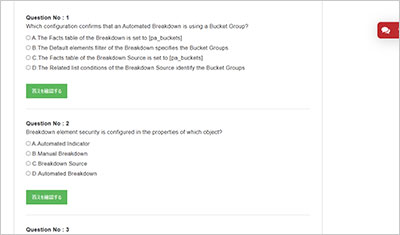
サンプル問題 3: When creating a breakdown on the age of a task, which table can be used as the Facts table of the Breakdown Source?
A: Task [task]
B: Bucket [pa_buckets]
C: Bucket Group
D: Choice [sys_choice]
正解:B
Explanation: When creating a breakdown based on the age of a task, the correct Facts table for the Breakdown Source is Bucket [pa_buckets]. In Platform Analytics, age-based breakdowns (such as 0C5 days, 6C10 days, etc.) are not derived directly from the Task table. Instead, they use bucketed data, which is generated by bucket groups during data collection. The pa_buckets table stores the calculated bucket values for records at collection time, making it the authoritative facts table for age, duration, and numeric range breakdowns. Bucket Groups define how values are grouped, while the Bucket table stores the actual bucket assignments used in analytics. The Task table itself cannot be used as the facts table for age breakdowns because Platform Analytics requires pre-aggregated, time-aware bucket data to ensure historical accuracy. The Choice table is only used for choice list values and is unrelated to numeric or age-based breakdowns. ServiceNow documentation clearly states that bucket-based breakdowns must reference the pa_buckets table to function correctly and produce accurate time series analytics.