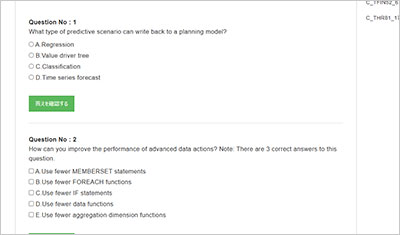
サンプル問題 1: What source system can you connect to with a live connection?
A: SAP ERP Central Component
B: SAP SuccessFactors
C: SAP Business ByDesign Analytics
D: SAP Datasphere
正解:D
Explanation: SAP Analytics Cloud can establish a live connection with various source systems, including SAP Datasphere. This allows for real-time data access and analysis without the need to replicate data into the cloud, which is beneficial for scenarios where data privacy and security are paramount. Reference: SAP Analytics Cloud Connection Guide1 SAC Live and Import Connection Overview2 SAP Analytics Cloud: Expand Live Data Source Options3 Live connection in SAP Analytics Cloud: advantages and challenges4 Explaining Where the Data Comes From - SAP Learning5
サンプル問題 2: You are using a live connection for a model. Where is the data stored?
A: Public dataset
B: SAP Analytics Cloud model
C: Source system
D: Embedded data set
正解:C
Explanation: Connections and data preparation When using a live connection in SAP Analytics Cloud, the data remains stored in the source system. This means that no data is imported or replicated into SAP Analytics Cloud; instead, it is accessed and analyzed in real-time directly from the source system. This approach ensures that the most current data is always used for analysis and that data governance and security policies of the source system remain in control. Reference: Live Data Connections to SAP S/4HANA | SAP Help Portal1 SAP Analytics Cloud Connection Guide2 SAP Analytics Cloud Data Connections - InsightCubes In the context of SAP Analytics Cloud, when using a live connection to connect to a data source, the data remains stored in the source system. This setup means that SAP Analytics Cloud directly queries the data in its original location, without importing or copying it into the SAP Analytics Cloud environment. This approach is advantageous for several reasons, including maintaining a single source of truth, reducing data redundancy, and ensuring data is always up-to-date without the need for synchronization processes. Live connections are particularly useful for real-time or near-real-time data analysis and reporting, providing insights based on the most current data available without the overhead of data replication. Reference: SAP Analytics Cloud documentation and user guides typically emphasize the benefits and use cases of live connections, highlighting how they maintain data in the source system to ensure real-time data access and analysis. SAP training materials for Data Analysts using SAP Analytics Cloud, including study guides and official certification resources, explain the technical and practical aspects of live connections, including where data is stored and how it is accessed. Best practice guides for SAP Analytics Cloud, often available through the SAP Community or SAP Knowledge Base, provide insights and recommendations on setting up and using live connections, reinforcing the concept that data stays in the source system.
サンプル問題 3: You are using a live connection for a model. Where can you define data security?
A: Source system
B: Data access control
C: SAP Analytics Cloud model
D: SAP Analytics Cloud role
正解:A
Explanation: When using a live connection in SAP Analytics Cloud, data security is defined and managed within the source system. This approach leverages the existing security protocols and permissions set up in the source system, ensuring that data governance and access controls remain consistent and are centrally managed. Users accessing data through SAP Analytics Cloud with a live connection will be subject to the same security constraints and permissions as if they were accessing the data directly from the source system. This integration ensures a unified security model, simplifying administration and ensuring data security and compliance.
SAP C_SAC_2501試験準備をしていますか?それとも自分は全部できそうです。復習する必要がないと思いますか?それとも自分は何もできないような気がします。どうすればいいでしょうか?実は、この問題を解決するのは難しくないです。勉強者がやるべきのは分解分析をマスターすることです。ここではC_SAC_2501問題集を使って学習中の課題を確認し、知識を整理してSAP Certified Associate - Data Analyst - SAP Analytics Cloud試験の準備を進めます。
C_SAC_2501問題集を利用して学習中の問題を探し出す。
SAP C_SAC_2501試験のすべての試験資料ポイントを勉強した後、C_SAC_2501問題集の中の問題点を練習してみてください。重要な試験点はどこにあるか、つまりSAPが把握してほしいものは何ですか?そして練習中の問題点を整理して分析してください。できない問題に対して、正しい答えの考えをはっきりさせたいです。それに関する知識点を明らかにします。間違った問題に対しては、具体的に自分がどこで間違っているかを見に行きます。このステップで使う試験資料ポイントは何ですか?間違った問題をこのように一歩分解して分析すると、自然に自分の復習する方向を見つけます。
その次に、非常規の試験ポイントのテーマは多すぎてこだわる必要はなくて、重要な試験点のテーマはきっと知識の点をわかります。特にSAP Certified Associate - Data Analyst - SAP Analytics Cloud試験は試験資料ポイントが多いです。一つの問題は知識ポイントだけではなく、復習する時はまとめをマスターして、記憶を分類します。知識ポイントが覚えていないか、間違えていないかのために点数をなくしてはいけません。