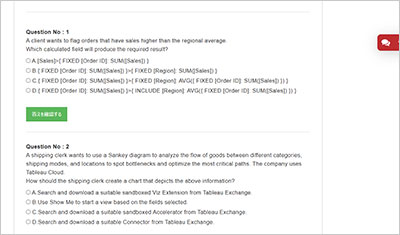
サンプル問題 1: A consultant wants to improve the performance of reports by moving calculations to the data layer and materializing them in the extract. Which calculation should the consultant use?
A: ZN([Sales])*(1 - ZN([Discount]))
B: CASE [Sector Parameter]WHEN 1 THEN "green"WHEN 2 THEN "yellow"
Explanation: To improve performance by moving calculations to the data layer and materializing them in the extract, the consultant should choose calculations that benefit from pre-computation and significantly reduce the load during query time: Aggregation-Level Calculation: The formula SUM([Profit])/SUM([Sales]) calculates a ratio at an aggregate level, which is ideal for pre-computation. Materializing this calculation in the extract means that the complex division operation is done once and stored, rather than being recalculated every time the report is accessed. Performance Improvement: By pre-computing this aggregate ratio, Tableau can utilize the pre-calculated fields directly in visualizations, which speeds up report loading and interaction times as the heavy lifting of data processing is done during the data preparation stage. Reference: Materialization in Extracts: This concept involves pre-calculating and storing complex aggregations or calculations within the Tableau data extract itself, improving performance by reducing the computational load during visualization rendering
サンプル問題 2: A consultant builds a report where profit margin is calculated as SUM([Profit]) / SUM([Sales]). Three groups of users are organized on Tableau Server with the following levels of data access that they can be granted. . Group 1: Viewers who cannot see any information on profitability . Group 2: Viewers who can see profit and profit margin . Group 3: Viewers who can see profit margin but not the value of profit Which approach should the consultant use to provide the required level of access?
A: Use user filters to access data on profitability to all groups. Then, create a calculated field that allows visibility of profit value to Group 2 anduse the calculation in the view in the report.
B: Specify in the row-level security (RLS) entitlement table individuals who can see profit, profit margin, or none of these. Then, use the tabledata to create user filters in the report.
C: Use user filters to allow only Groups 2 and 3 access to data on profitability. Then, create a calculated field that limits visibility of profit value toGroup 2 and use the calculation in the view in the report.
D: Specify with user filters in each view individuals who can see profit, profit margin, or none of these.
正解:C
Explanation: The approach of using user filters to control access to data on profitability for Groups 2 and 3, combined with a calculated field that restricts the visibility of profit value to only Group 2, aligns with Tableau’s best practices for managing content permissions. This method ensures that each group sees only the data they are permitted to view, with Group 1 not seeing any profitability information, Group 2 seeing both profit and profit margin, and Group 3 seeing only the profit margin without the actual profit values. This setup can be achieved through Tableau Server’s permission capabilities, which allow for detailed control over what each user or group can see and interact with12. Reference: The solution is based on the capabilities and permission rules that are part of Tableau Server’s security model, as detailed in the official Tableau documentation12. These resources provide guidance on how to set up user filters and calculated fields to manage data access levels effectively.
サンプル問題 3: A client is using the Tableau Content Migration Tool to move content from an old Tableau Server to a new Tableau Server. Which content will need to be moved using a different tool or process?
A: Published data sources that use live connections
B: Tableau Prep flows
C: Published data sources that use extracts
D: Workbooks
正解:B
Explanation: When migrating content between Tableau servers, certain types of content may require special consideration or different tools for migration: Tableau Prep Flows: These are specific to Tableau Prep and are not included in the standard content migration capabilities of the Tableau Content Migration Tool. Tableau Prep flows often require separate processes for migration due to their distinct setup and integration with data sources and workflows. Published Data Sources and Workbooks: These can typically be migrated directly using the Tableau Content Migration Tool, which supports moving published data sources (both live connections and extracts) and workbooks without requiring additional tools. Reference: Tableau Help and Support: Offers comprehensive tutorials and guidelines on using different tools for migrating various types of content, including the specific requirements for migrating Tableau Prep flows which are not covered by the standard content migration tool.